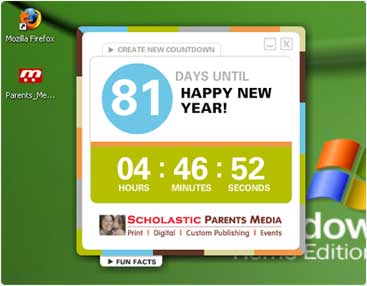

Download Your Desktop Widget
– A Gift from Scholastic Parents Media
Follow the simple directions below to download your own countdown desktop widget. Then just select a date, theme and graphic and you're ready to go. Have fun counting the days!
Download for:



Mac Download Instructions
The desktop countdown will work on Mac OS X and later.- Click on Mac and select Save to Disk in the dialog box appears.
- Double click on Parents_Media_Desktop.sit file you have downloaded.
- Move the new file Parents_Media_Desktop.app to a location you would like it stored and then open it.
- Double click on Parents_Media_Desktop.app.
- Select a date and a theme.
- Click on the X on the top right of the desktop countdown.
- Move the Parents_Media_Desktop.exe into your Trash and empty your trash.

PC Download Instructions
The desktop countdown will work on Windows XP and Vista.- Click on PC and select Save when the dialog box appears.
- Select the ZIP in the location you saved it in, right-click, and Extract All
- Move the new file Parents_Media_Desktop.exe to the location you would like it stored and then open it.
- Double click on Parents_Media_Desktop.exe.
- An "Open File - Security Warning" dialog box may open. Select Run.
- Select a date and a theme.
- Click on the X on the top right of the desktop countdown.
- Delete the Parents_Media_Desktop.exe and empty your Recycle Bin.